Προσφέρουμε καθημερινά ΔΩΡΕΑΝ λογισμικό με άδεια χρήσης, που θα αγοράζατε σε διαφορετική περίπτωση!

Giveaway of the day — WinToUSB Professional 8.0
WinToUSB Professional 8.0 ήταν διαθέσιμο ως προσφορά στις 30 Αυγούστου 2023!

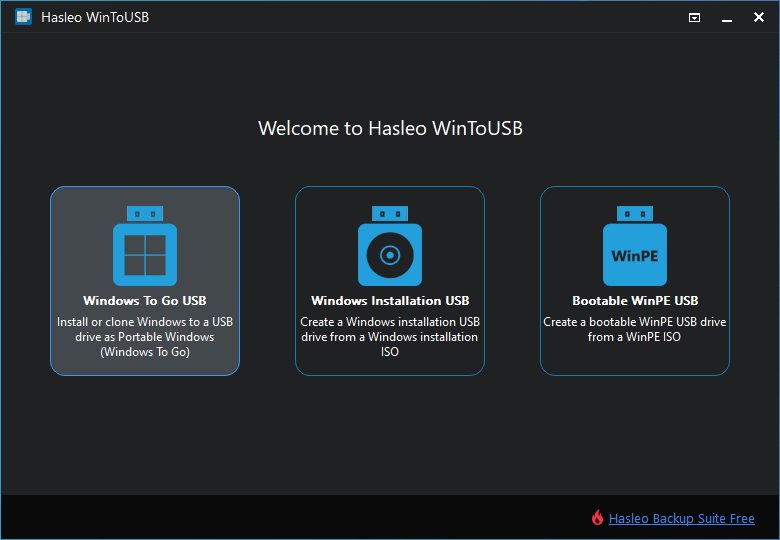
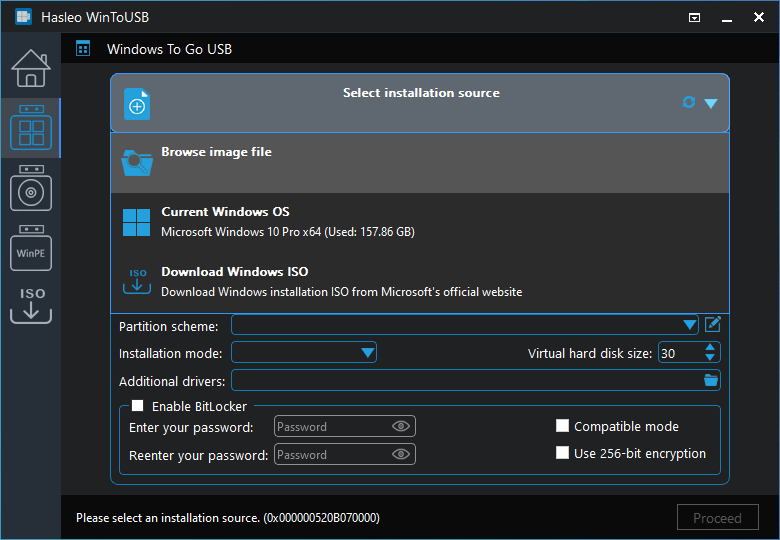
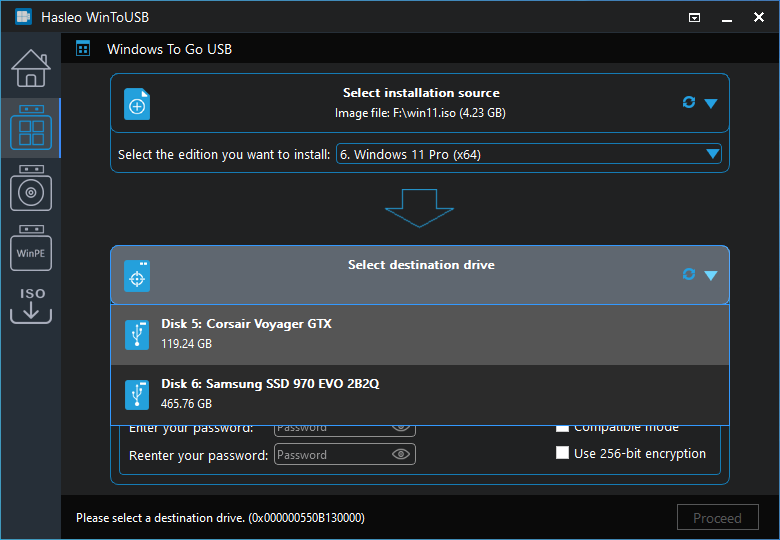
Το WinToUSB είναι το πρώτο και καλύτερο Windows To Go Creator στον κόσμο που σας επιτρέπει να εγκαταστήσετε και να εκτελέσετε ένα πλήρως λειτουργικό λειτουργικό σύστημα Windows σε έναν εξωτερικό σκληρό δίσκο ή μια μονάδα flash USB. Είναι τόσο εύκολο και αποτελεσματικό, με λίγα απλά βήματα και λίγα λεπτά, μπορείτε να δημιουργήσετε τα πρώτα σας φορητά Windows 11/10/8/7 απευθείας από ένα αρχείο εικόνας ISO, WIM, ESD, SWM, VHD, VHDX ή Μονάδα CD/DVD ή μπορείτε να τη χρησιμοποιήσετε για να κλωνοποιήσετε μια υπάρχουσα εγκατάσταση λειτουργικού συστήματος Windows 11/10/8/7 σε μια μονάδα USB ως φορητά Windows. Το WinToUSB υποστηρίζει επίσης τη δημιουργία μιας μονάδας flash USB εγκατάστασης των Windows από ένα αρχείο ISO εγκατάστασης Windows 11/10/8/7/Vista/2022/2019/2016/2012/2010/2008, ώστε να μπορείτε να εγκαταστήσετε τα Windows από τη μονάδα flash USB εύκολα.
The current text is the result of machine translation. You can help us improve it.
Προαπαιτούμενα:
Windows 7 or later (x32/x64); CPU: Intel Pentium Processor 1GHz (32 bits or 64 bits) or above; RAM:1 GB (2 GB Recommended); Hard Disk Space: 1 GB of free space; Display Device 1024x768 graphic device (higher resolution recommended)
Εκδότης:
Hasleo SoftwareΣελίδα:
https://www.easyuefi.com/wintousb/Μέγεθος Αρχείου:
23.5 MB
Licence details:
1 year license
Τιμή:
$29.95
Προτεινόμενοι τίτλοι
Το καλύτερο δωρεάν λογισμικό δημιουργίας αντιγράφων ασφαλείας των Windows σάς βοηθά να προστατεύσετε το λειτουργικό σύστημα Windows και την ασφάλεια δεδομένων! Το Hasleo Backup Suite είναι ένα δωρεάν λογισμικό δημιουργίας αντιγράφων ασφαλείας και επαναφοράς των Windows, το οποίο ενσωματώνει δυνατότητες δημιουργίας αντιγράφων ασφαλείας, επαναφοράς και κλωνοποίησης, έχει σχεδιαστεί για χρήστες λειτουργικού συστήματος Windows και μπορεί να χρησιμοποιηθεί τόσο σε υπολογιστές με Windows όσο και σε διακομιστές. Η δυνατότητα δημιουργίας αντιγράφων ασφαλείας και επαναφοράς του Hasleo Backup Suite μπορεί να σας βοηθήσει να δημιουργήσετε αντίγραφα ασφαλείας και να επαναφέρετε τα λειτουργικά συστήματα, τους δίσκους και τα διαμερίσματα των Windows για την προστασία της ασφάλειας του λειτουργικού συστήματος Windows και των προσωπικών σας δεδομένων. Η δυνατότητα κλωνοποίησης του Hasleo Backup Suite μπορεί να σας βοηθήσει να μετεγκαταστήσετε τα Windows σε άλλο δίσκο ή να αναβαθμίσετε εύκολα έναν δίσκο σε SSD ή σε δίσκο μεγαλύτερης χωρητικότητας.
Το Hasleo BitLocker Anywhere είναι η πρώτη και μοναδική στον κόσμο λύση BitLocker για Windows 11/10/8.1/8/7 Home Editions & Windows 7 Professional Edition. Με αυτό μπορείτε να απολαύσετε σχεδόν όλες τις δυνατότητες του BitLocker Drive Encryption σε αυτές τις εκδόσεις των Windows, όπως την κρυπτογράφηση τόμων με το BitLocker Drive Encryption και την αλλαγή του κωδικού πρόσβασης για τους κρυπτογραφημένους τόμους BitLocker.
Διαχείριση επιλογών εκκίνησης EFI/UEFI & Διαχείριση κατατμήσεων συστήματος EFI & Διόρθωση προβλημάτων εκκίνησης EFI/UEFI. Ο EasyUEFI διαθέτει ολοκληρωμένες λειτουργίες διαχείρισης επιλογών εκκίνησης EFI/UEFI, όπως δημιουργία, διαγραφή, επεξεργασία, εκκαθάριση, δημιουργία αντιγράφων ασφαλείας και επαναφορά επιλογών εκκίνησης EFI/UEFI, καθορίζει μια καταχώριση εκκίνησης μία φορά για την επόμενη επανεκκίνηση ή αλλάξτε τη σειρά εκκίνησης EFI/UEFI χωρίς να εισέλθετε στη ρύθμιση του BIOS. Το EasyUEFI απελευθερώνει επίσης μια δυνατότητα που σας επιτρέπει να δημιουργήσετε αντίγραφα ασφαλείας, να επαναφέρετε, να δημιουργήσετε ξανά το διαμέρισμα συστήματος EFI (ESP) ή να μετακινήσετε το διαμέρισμα συστήματος EFI από τη μια μονάδα δίσκου στην άλλη.
Εγκαταστήστε, επανεγκαταστήστε, κλωνοποιήστε τα Windows 11/10/8/7 χωρίς τη χρήση CD/DVD ή μονάδας USB! Το WinToHDD σάς επιτρέπει να εγκαταστήσετε ή να επανεγκαταστήσετε τα Windows χωρίς CD/DVD ή μονάδα USB. Με αυτό το εργαλείο ανάπτυξης των Windows All-in-One, μπορείτε εύκολα να επανεγκαταστήσετε τα Windows, να εγκαταστήσετε τα Windows σε δίσκους διαφορετικούς από αυτόν όπου είναι εγκατεστημένο το λειτουργικό σύστημα Windows ή να κλωνοποιήσετε μια υπάρχουσα εγκατάσταση του λειτουργικού συστήματος Windows σε άλλους δίσκους. Επιπλέον, μπορείτε να το χρησιμοποιήσετε για να δημιουργήσετε μια μονάδα flash USB πολλαπλών εγκαταστάσεων των Windows για να εγκαταστήσετε οποιαδήποτε έκδοση των Windows σε υπολογιστές BIOS και UEFI.

100% δωρεάν λογισμικό ανάκτησης δεδομένων για οικιακούς χρήστες των Windows! Το Hasleo Data Recovery δωρεάν είναι ένα ισχυρό και αξιόπιστο λογισμικό ανάκτησης δεδομένων για την επίλυση προβλημάτων απώλειας δεδομένων, είτε διαγράψατε κάποια αρχεία κατά λάθος, μορφοποιήσατε μια μονάδα δίσκου ή αντιμετωπίσατε σφάλμα συστήματος και χάσατε ορισμένα αρχεία. Με τρία μόνο βήματα, μπορείτε να ανακτήσετε χαμένα αρχεία από σκληρό δίσκο υπολογιστή, μονάδα USB, κάρτα SD, ψηφιακή κάμερα και άλλα μέσα αποθήκευσης. Επιπλέον, μπορεί να ανακτήσει αρχεία από την κρυπτογραφημένη μονάδα Windows BitLocker με την προηγμένη έκδοση.
GIVEAWAY download basket




Προσφορές για iPhone »





Προσφορές για Android »





Σχόλια σχετικά με το WinToUSB Professional 8.0
Please add a comment explaining the reason behind your vote.
WinToUSB Pro is another way to create a Windows To Go drive -- alternatives include AOMEI Partition Assistant and Rufus. Basically it consists of the files Windows normally uses, *applied* to a [usually MBR] drive using Windows DISM [Deployment Image Servicing and Management], with a FAT32 boot partition added. The recovery partition is normally skipped. When run for the 1st time on whatever hardware Win10 & 11 will download and install the needed drivers, *as long as they're available from Microsoft* [not all drivers are]. WinToUSB Pro can also create USB sticks with WinPE without having to install the Windows ADK -- using the ADK to create bootable WinPE USB sticks isn't hard, but the ADK takes up 2.3GB. And WinToUSB Pro can create a bootable USB stick with Windows setup files, including bypassing Win11's hardware checks. So can the free Rufus, and Ventoy, which lets you put multiple OS setup files on the same USB stick, e.g., Win10 & 11. Note: Bear in mind that Microsoft is changing the way Windows boots, though they now say we've got about a year until it takes effect. When the change is complete most currently available bootable USB sticks will no longer work, while existing Win2Go drives may or may not be updateable to work with the new modifications.
support.microsoft.com/en-us/topic/kb5025885-how-to-manage-the-windows-boot-manager-revocations-for-secure-boot-changes-associated-with-cve-2023-24932-41a975df-beb2-40c1-99a3-b3ff139f832d
IMHO it's worth creating a Windows To Go drive if you troubleshoot & fix Windows &/or PC/laptop hardware. It also works well in place of bootable USB sticks &/or portable apps, especially when whatever app's USB sticks don't work, or portable versions of software like partition managers aren't available. And it's a decent way to see how Win11 will behave on hardware running Win10 without going to the trouble of installing it. In some situations, running Windows off a USB drive might even be preferable, e.g., completely eliminating access to your stuff when using a shared computer. While it is possible to use a USB stick for a Win 2 Go drive, they're generally FAR too slow, making it painful to use -- use an SSD in an external housing. 120 & 240GB SSDs are incredibly cheap right now, and you can find housings on sale for $5 - $10. FWIW I like to use a Windows Enterprise ISO to create Win 2 Go drives, avoiding any complications regarding activation, effects on activation from changing hardware etc. The limitations from running Windows unactivated are really minimal. It is possible to create a dual or multi-boot Windows to Go drive -- create the individual Win2Go drive, perform a partition image backup, create a 2nd Win2Go drive, reduce the size of the partition, restore the backup to that now unallocated space, and use EasyBCD [or Windows BCDEdit] to add it to the boot menu.
Those are the pros. The cons include... sometimes the changes that are made to Windows to work with particular hardware will mean it won't work on any other hardware from then on -- I've run into this with an Asus motherboard -- so you really do need to have an image backup that you can restore to the drive if you want to use it on other hardware. The driver software that's automatically added can also sometimes cause problems with other hardware, as well as contributing to bloat. And you do have to update your Win2Go drive(s), just as you update regular copies of Windows.
Save | Cancel