Ελληνικά
Προσφέρουμε καθημερινά ΔΩΡΕΑΝ λογισμικό με άδεια χρήσης, που θα αγοράζατε σε διαφορετική περίπτωση!
$35.00
ΕΛΗΞΕ
Giveaway of the day — Shadow Defender 1.4.0
Shadow Defender protects your PC/laptop against malicious activities.
$35.00
ΕΛΗΞΕ
Αξιολόγηση Χρηστών:
355
Σχολιάστε
Shadow Defender 1.4.0 ήταν διαθέσιμο ως προσφορά στις 28 Δεκεμβρίου 2015!
Σήμερα Giveaway of the Day
Πραγματοποιήστε όλες τις απαιτήσεις σας για δημιουργία αντιγράφων ασφαλείας και επαναφορά Android.
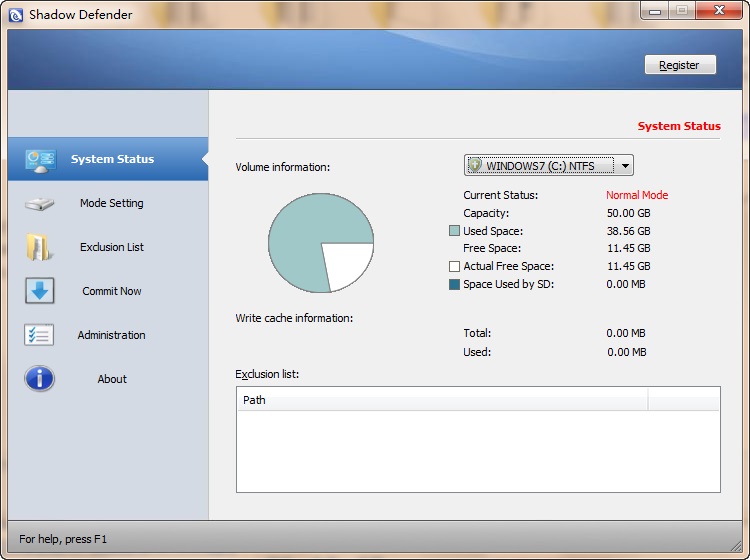
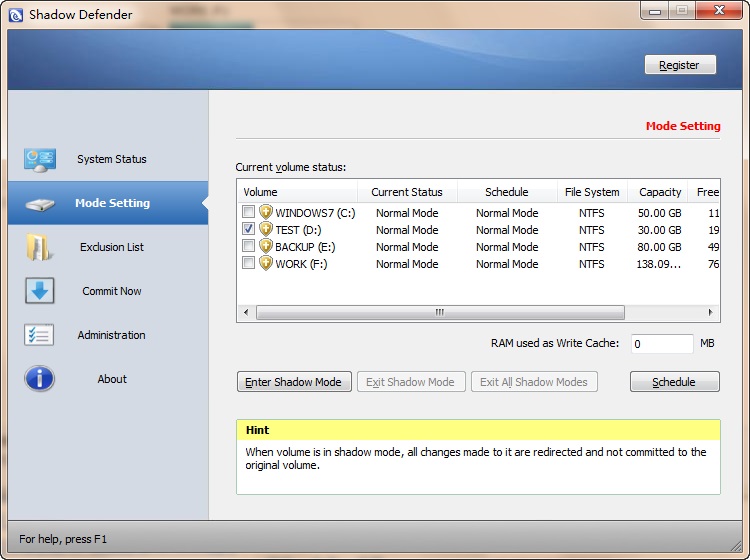

Shadow Defender is an easy-to-use security solution for Windows operating systems, that protects your PC/laptop real environment against malicious activities and unwanted changes.
Key features:
- Optimal State - Configure your system exactly the way you want it ONCE and run in that optimal state at all times. No need to spend the time removing unwanted files or trouble shooting and eliminating unwanted PC changes;
- System Recovery- Reduce the Total Cost of Ownership (TCO) for managing and maintaining your PCs by simply rolling the systems back to an optimal state;
- System Security - Surf the internet without a trace of unwanted cookies, internet history, temporary files, spam applications or spyware;
- Virus Protection - Prevent downtime and system damage due to virus and worm outbreaks. Prevent the virus from ever being written to the hard disk;
- Change Management - Maximize system uptime by instantly undoing accidental or malicious system changes.
Προαπαιτούμενα:
Windows XP/ 2003/ Vista/ 7/ 8/ 10 (x32/x64); CPU: Pentium 133 MHz or faster; RAM: 128 MB or above; SPACE: Hard drive space requirements are 3 MB for program files and 10M or more free space for each partiton in Shadow Mode
Εκδότης:
ShadowDefender.comΣελίδα:
http://www.shadowdefender.com/index.htmlΜέγεθος Αρχείου:
7.8 MB
Τιμή:
$35.00
GIVEAWAY download basket
Developed by Hewlett-Packard

Developed by Kaspersky Lab

The standard anti-malware solution for Windows.

Recover lost or forgotten passwords for RAR files.
Προσφορές για iPhone »

Phone Drive allows you to store, view and manage files on your iPhone or iPad.
$3.99 ➞ Δωρεάν σήμερα

This action roguelite platformer offers challenging new experiences every time you play.
$2.99 ➞ Δωρεάν σήμερα

$5.99 ➞ Δωρεάν σήμερα

$0.99 ➞ Δωρεάν σήμερα

$2.99 ➞ Δωρεάν σήμερα
Προσφορές για Android »

$0.99 ➞ Δωρεάν σήμερα

Enjoy a relaxing game with a combination of farm-unblocking puzzles, adorable animals, and chaos!
$4.99 ➞ Δωρεάν σήμερα

$0.99 ➞ Δωρεάν σήμερα

Linea is a colorful square icon pack with line style, black and white colored main icons.
$1.49 ➞ Δωρεάν σήμερα

$1.49 ➞ Δωρεάν σήμερα
Σχόλια σχετικά με το Shadow Defender 1.4.0
Please add a comment explaining the reason behind your vote.
I have a license for Shadow Defender (SD) and have used it for many months. It does what it says very well. Let me clear up a few things I've found within the comments.
First of all, there are several other programs that do the same thing SD does. What it does is simply redirect all write requests on the 'shadowed' drive to a special file, meaning the actual drive doesn't get modified, and when you exit shadow mode that file is deleted and your system remains intact as it was before. There's really no overwhelming reason to choose SD over others that work just as well, like ToolWiz Time Freeze, Rollback RX, Deep Freeze or others. I chose it because I liked its simplicity.
Second, Shadow defender has no noticeable impact on system performance whether in shadow mode or not. You can run any app, game or whatever, but realize that if you have a drive in shadow mode, if your program writes to it, what it wrote will be gone when you exit shadow mode. It is possible to extract files from the shadowed volume if you need to however.
Third, if you want to test install a program and you want to do it in shadow mode but the program requires a reboot, just remember when you go into shadow mode to select the option to 'Enter Shadow Mode on Boot'. SD's default is to exit shadow mode on reboot, but you don't have to leave it that way. Also bear in mind that ALL programs that SAY they need you to reboot don't really need it. You can always try running the installed program without rebooting; the worst that can happen is you get a message saying the program can't run until you reboot!
Fourth, SD differs from SandboxIE and similar programs in that sand-boxing programs run specific programs in a 'sandbox' and doesn't allow them to modify your drives or Windows registry. To exit the sandbox you just close the program. Programs like SD in effect 'sand-box' your whole computer so that ANY program, including Windows itself, is not able to permanently modify the contents of the shadowed drive(s). Programs of this type usually require a reboot in order to exit the protected mode.
I think SD is one of the better of these kinds of programs, in that it doesn't require a reboot to ENTER its protected mode like some others do, and it doesn't affect overall system performance to a noticeable degree or lengthen reboot time (like Rollback RX does). It's interface is simple and functionality is straightforward. I suggest you take an image of your system, then give it, and some others if you like, a try.
Save | Cancel
There are a handful of apps that redirect hard drive reads/writes to a virtual hard disk, so that what would otherwise be permanent changes to the hard drive are now temporary. Some like Shadow Defender allow you to write what's stored on that virtual hard disk to your real hard drive -- others like Time Freeze don't, so if you want a change to be permanent, you have to repeat those changes while the software is not protecting the drive. With most of these apps, including Shadow Defender, you can easily switch protection on/off. Turning protection off usually means a re-boot, so they're for the most part not particularly useful when a software install require restarting the system, since you lose all changes.
The virtual hard disk file they use takes up usually 3-5 GB of hard drive space. Shadow Defender can use available RAM [memory] 1st, writing to that virtual disk when it needs more space. Time Freeze doesn't boast this feature, but if/when you delete the virtual disk file it continues to work -- it's speculated that it then uses only RAM. Usually protection is limited to the system drive, as that's the one that's most important since Windows lives there, but most let you extend protection to other drives &/or partitions. Many like Shadow Defender let you set folders that will be exempt from protection, e.g. if you wanted to download & save a file. One or more of these apps are designed to protect everything, so you have to take extra steps to exclude a folder to store anything permanently.
Because everything headed to/from your hard drive is redirected, & because virtual hard disks are slower than real drives, these virtualization apps unavoidably slow things down -- in that way they're similar to anti virus software examining every file used. Their ad copy generally talks about how they prevent all sorts of malware infections, but I've never seen anyone write that outside of these company reps &/or ad copy -- security researchers for example use specially isolated test systems & VMs [Virtual Machines]. Malware has been found that seeks out & writes to any available storage, including over a network, & even including the system bios, so while this sort of virtualization does help protect you, you might not want to place total faith in their usage.
DO perform a full system drive/partition backup before installing a virtualization app like Shadow Defender, Time Freeze etc. The way that they work means that they need to install drivers, & those drivers are not 100% compatible with everything.
I use these sorts of apps, though sparingly. Right now, typing this, I see little benefit that they could provide. Testing software I prefer VMs, because that way I can better monitor software installation & behavior in a minimalistic environment. IOW I can use a VM with almost no software installed, whereas a regular copy of Windows without software would to me be almost useless. Where I find them useful is when I want/need to check how new software behaves together with the other installed software on a system -- something that can't be duplicated with a VM because a VM will not use the same drivers as your real hardware.
These virtualization apps do work fine with Windows 10, providing you're using a version designed to be compatible with 10 itself. Problems I've read about using one of these apps with 10 seem to me to be more Windows 10 problems, rather than the software itself. [Some of the layoffs at Microsoft eliminated people responsible for testing, making the coders much more responsible for their own quality control -- from a consumer standpoint the results have not always been ideal.] That said, with Windows 10 forethought can help, e.g. start 10, check for updates [including AV software & the Store], *then* activate protection. It's not bulletproof, but odds are you won't encounter another update for at least a few [if not several] hours, & if you do encounter an update, it's no different than installing new software, as after a reboot it's gone -- you just have to repeat the update with the protection turned off.
For those people running multi-boot systems [i.e. more than one OS installed] software like [& including] Shadow Defender in my experience still works fine, but be sure to read any documentation to make sure... Some software combines features of a backup app with this soft of virtualization, & I have come across one or two of those apps that specifically say they won't work if you dual or multi boot. I've had Shadow Defender installed in one of the copies of 10 on my hard drive, & it's had zero effect on any of the other installed copies of Windows [7 & 10].
Save | Cancel
Tested on a dual boot Windows 10 and Windows 7 (x64).
I have a problem which I have been unable to resolve when dual booting, as I have the documents folder shared between both systems, and when I use MS 2010 Outlook when booted into Windows 10, it corrupts the .pst files in Outlook email, and when I boot back into my main OS, Windows 7, I have to restore the Outlook files.
I installed this GOTD on to Windows 10, WARNING here, by default it starts on booting, so disable this when you first install until you are sure what you are actually doing, also disable auto update as I would assume this will invalidate your installed copy as it is restricted to "as is". All this is done under the "administration" tab.
I shadowed all drives except the one with Windows 10 installed, as auto updates is the default on Windows 10, and the help information for Shadow Defender specifically warns you NOT to update your OS whilst Shadow defender is running, which makes it pretty useless for Windows 10 as it seems to update when it like.
Anyway, installed on Windows 10 and running to protect all drives except windows 10 drive, it does work, only problem I found was that when I booted back into Windows 7, it detected "another" installed software had interfered with a drive, and checked it and "fixed" it, but all seems OK.
Bottom line is, it does work on dual boot, but with caveats, so care is needed. Do though use the administration tab to set it up.
I will keep it installed but only for occasional use when I am trying to debug the problem I have with shared files with Windows 7 being corrupted by Windows 10.
Hope all this makes sense.
Brian
Save | Cancel
I have a lifetime license of this software but I almost doesn't use it anymore.
The reason is because you just can't test any software which needs a reboot because at this moment your computer will revert back to its previous state and you will just not be able to test this software.
Because you have no mean to know in advance which software will need a reboot and which software will not need one, you are simply better to test the new softwares on a second OS which will serve only for testing.
All you have to do is to reboot your computer and to enter in your testing OS for testing a new software. This is a little bit less secure than Shadow Defender but if your testing OS get corrupted you just have to reboot your computer, enter in your regular OS and reinstall an old incorrupt image of your testing OS.
This way of doing is completely free : you just have to use a software like EasyBCD to manage your dual boot.
If Shadow Defender would have the capacity to stay in a shadow mode after the reboot and preserving what would have been installed in a previous shadow mode (the one in which you were before the reboot), like "Try and Decide" of Acronis is able of, I would surely use again Shadow Defender but until this moment, the use of Shadow Defender is a loss of time for me.
Save | Cancel
That link to the review on Softpedia is corrupt. It brings up some nonsense about a Surly Toolbar ... not willing to click on any link on a page like that.
Save | Cancel