Προσφέρουμε καθημερινά ΔΩΡΕΑΝ λογισμικό με άδεια χρήσης, που θα αγοράζατε σε διαφορετική περίπτωση!
Giveaway of the day — Process Lasso Pro 9
Process Lasso Pro 9 ήταν διαθέσιμο ως προσφορά στις 25 Μαΐου 2018!

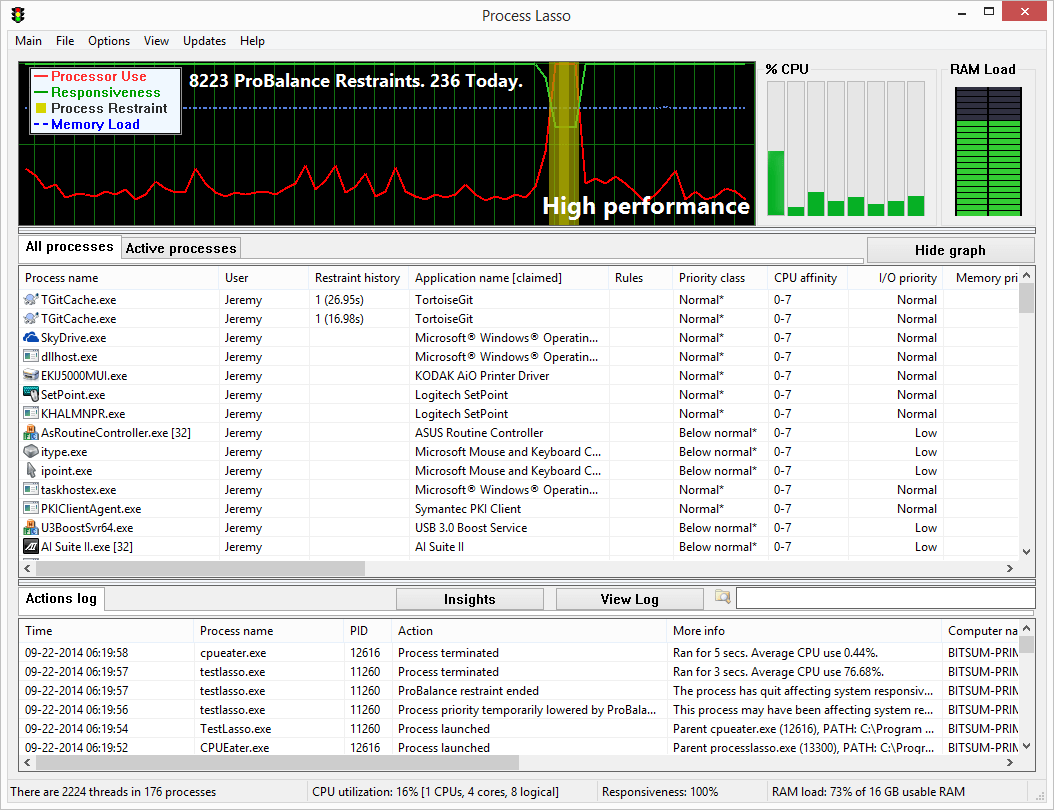
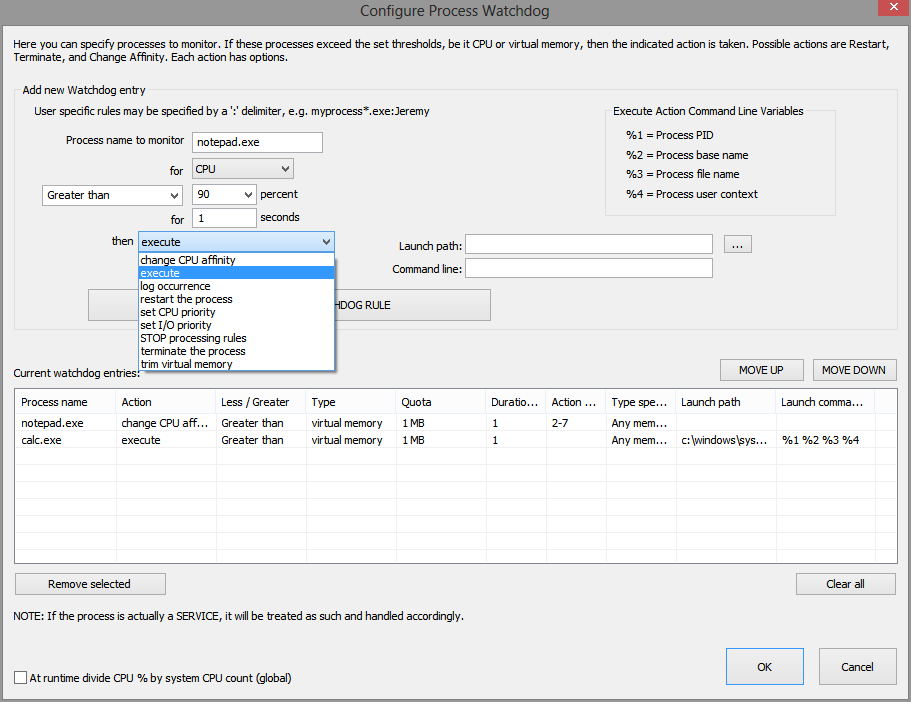
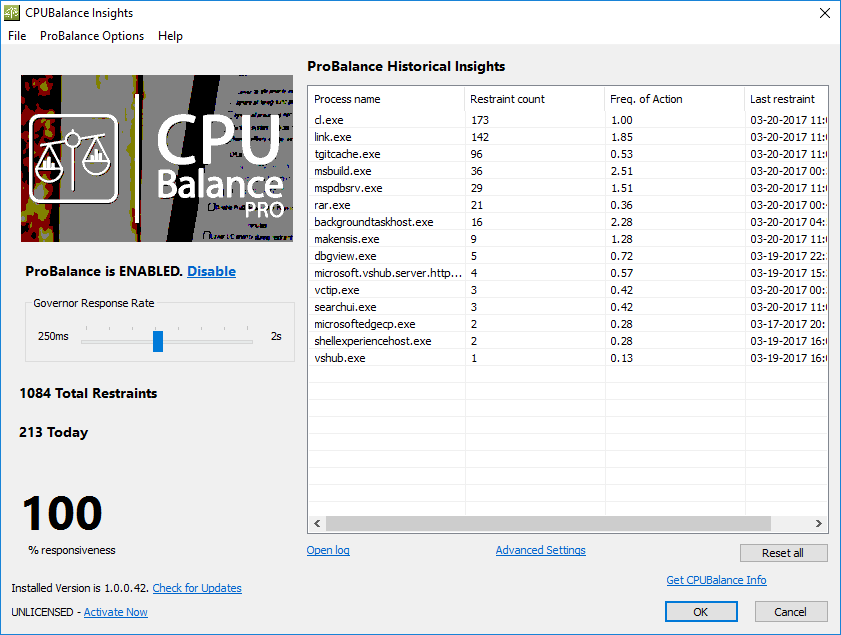
Διαδικασία Λάσο, ΔΕΝ είναι άλλο ένα έργο του διαχειριστή. Αντί να περιέχει ένα στόλο αλγόριθμοι έχουν σχεδιαστεί για να ενισχύσει δυναμικά την απόδοση του ΥΠΟΛΟΓΙΣΤΉ σας και να διατηρήσει την ανταπόκριση κατά τη διάρκεια της υψηλής φορτία. Ανάμεσά τους είναι το περίφημο μας ProBalance αλγόριθμο, η οποία μειώνει προσωρινά την προτεραιότητα των ενοχλητικών διεργασίες παρασκηνίου, ώστε να βελτιώσει το PC ανταπόκριση, όπως φαίνεται στον πραγματικό κόσμο και συνθετικές δοκιμές.
Στη συνέχεια, υπάρχει η Bitsum Υψηλότερη Απόδοση του σχεδίου παροχής ενέργειας, η οποία είναι σχεδιασμένη για να σας δώσει τη μέγιστη απόδοση όταν τη χρειάζεστε, και IdleSaver να πέσει κάτω σε ένα πιο συντηρητικό σχέδιο παροχής ενέργειας, όταν με τα πόδια.
Περαιτέρω, ο χρήστης μπορεί να αυτοματοποιήσει όλα τα είδη των ρυθμίσεων του συστήματος με κανόνες και επίμονη διαδικασία προτεραιότητες, CPU συγγένειες, κλπ... Αυτή είναι η πραγματική συμφωνία, μην κάνετε κανένα λάθος! Προορίζεται για τους χρήστες, αλλά ακόμα μέσο όρο, οι χρήστες μπορούν να το χρησιμοποιούν με την απλή εγκατάσταση. Καμία περαιτέρω ρύθμιση απαραίτητο στις περισσότερες περιπτώσεις! Επισκεφθείτε https://bitsum.com για περισσότερες πληροφορίες.
Τι Νέο υπάρχει:
- Ρύθμιση για τις τελευταίες Επεξεργαστές και συσκευές *
- Βελτιωμένο πυρήνα αξιοποίηση επίδειξη
- Γράφημα χρώμα προσαρμογή
- Μια πληθώρα άλλων σταδιακή βελτίωση.
The current text is the result of machine translation. You can help us improve it.
Προαπαιτούμενα:
Windows Vista/ 7/ 8/ 10 and Windows Server 2012-2016; Approx 50Mb of disk space
Εκδότης:
Bitsum TechnologiesΣελίδα:
https://bitsum.com/Μέγεθος Αρχείου:
1.77 MB
Τιμή:
$36.00
Προσφορές για iPhone »





Προσφορές για Android »





Σχόλια σχετικά με το Process Lasso Pro 9
Please add a comment explaining the reason behind your vote.
Process Lasso helps, though when it comes to making a noticeable difference, your mileage will vary depending on Windows version and the device's hardware. We've got 4 low powered devices with win10 1803 -- (2) tablets running Atom CPUs, a miniPC running a Celeron, & a 2-in-1 running an i3 -- where Process Lasso makes a definite, positive difference. However it's not just about the CPU -- the 2-in-1 has a slow hard drive, and nothing short of replacing that drive is going to boost performance when that drive's the bottleneck, so the real world effects of Process Lasso are more limited than on the other 3 devices. This PC OTOH is running an i7, as I type this it's using 4% CPU @ 799 MHz, while using ~3.5 GB RAM out of 16 GB, so there is much less benefit to running Process Lasso at the moment.
Nathan wrote: "... if you have a quad processor or higher, you will not notice any difference in the performance." & "In win 10, slowing down the background (those are the drivers that make your system run smooth and fast) will cause jittery screens, poor video and communications..."
That has not been my experience -- it's really easy to turn the app on/off so you can judge its effects for yourself, & I suggest folks do just that, with one potential caveat... on those low powered devices, Task Mgr. in win10 1803 uses a LOT more resources than prior versions, so if you use Windows Task Mgr. to monitor the results using Process Lasso, you might suffer enough of a performance hit to negate its benefits. [I have not noticed an increase in the amount of resources Process Lasso uses in 1803.]
Process Lasso is a quick & easy install, so you're only risking a few minutes of your time trying it out.
Save | Cancel
This software was great a decade ago when we dealt with single core processors, now, if you have a quad processor or higher, you will not notice any difference in the performance.
What I do not like about process Lasso is the ability to slow down background processes to give you more power in foreground, if you do that, the net result is a washout (no over all noticeable gain is achieved).
In win 10, slowing down the background (those are the drivers that make your system run smooth and fast) will cause jittery screens, poor video and communications, especially if you run a home network or any kind of a server.
Save | Cancel
I've been using this program for years and it does help to keep the computer running smoothly when you have a program hogging CPU etc.
I was able to download and attempt to install the program but it won't complete the install with a message that this version is not for my OS!
Apparently the download is for Windows 7, 64 bit. But I am running Windows 7, 32 bit.
I went to the Process Lasso home page, downloaded the 32 bit pro version and was able to enter the activation code from this page.
Thank you Bitsum and GOTD for this great program.
Save | Cancel
For those who are critical of my #1 response...... I installed Win 10 x32 on a grossly underpowered - and rather ancient - Lenovo S10-2 some time back --> and "Cool Beans System Info" showed the Atom CPU was flogging itself to near-death at 100% - and seldom going lower!
After installing this Process Lasso program - and fiddling with its settings {Blindly I might add} it is NOW coasting along at around 19% CPU usage!
A vast improvement on the previous 100% CPU usage which, previously, went on for hours!
Save | Cancel
Being a user of 3D art applications, there was no way I was going to miss out on this one. After reading the promo above and learning what it does, plus the comments here thus far, I decided this was for me. So I downloaded it, installed it, got the activation code and entered it as per the readme instructions, and one activated, I got immediate results. My PC runs way too many background processes, eating up my RAM incessantly, and this program has reduced the amount of RAM usage considerably.
Thank you, GOTD and BitSum!
Save | Cancel