Προσφέρουμε καθημερινά ΔΩΡΕΑΝ λογισμικό με άδεια χρήσης, που θα αγοράζατε σε διαφορετική περίπτωση!
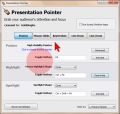
Giveaway of the day — Presentation Pointer 1.4.2
Presentation Pointer 1.4.2 ήταν διαθέσιμο ως προσφορά στις 2 Μαΐου 2014!
Στις παρουσιάσεις το σημαντικότερο είναι να τραβήξετε και να εστιάσετε την προσοχή του κοινού σας. Το Presentation Pointer κάνει εύκολο για το κοινό σας να ακολουθήσει τις ενέργειες σας στην οθόνη. Προσθέτει δυνατότητες υπερτονισμού και περισσότερα οπτικά και ακουστικά εφέ στα κλικ του ποντικιού σας.
Προβάλει ακόμα τις πληκτρολογήσεις σε υπέρθεση στο κάτω μέρος της οθόνης και σας επιτρέπει να σχεδιάσετε ελεύθερα στην οθόνη αλλά χωρίς να κλειδώσετε την οθόνη, έτσι μπορείτε να σχεδιάσετε σε ένα βίντεο ενόσω αναπαράγεται. Το Presentation Pointer είναι ένα βασικό εργαλείο για όλους και να κάνουν παρουσιάσεις σε εκθέσεις, παρουσιάσεις και εκπαιδεύσεις.
Προσφέρουμε έκπτωση 50% σε άδειες εφ όρου ζωής για τους χρήστες του GOTD (δωρεάν αναβαθμίσεις/ενημερώσεις και υποστήριξη εφ όρου ζωής). Πατήστε εδώ για να το πάρετε.
Προαπαιτούμενα:
Windows XP, Vista, 7, 8 (x32/x64)
Εκδότης:
GoldGingko SoftwareΣελίδα:
http://www.presentation-assistant.com/ppointer/index.htmΜέγεθος Αρχείου:
8.85 MB
Τιμή:
$29.95
Προτεινόμενοι τίτλοι
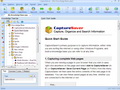
Όποιος περιηγείται στο Net χρειάζεται να διατηρήσει διάφορες πληροφορίες. Με το CaptureSaver μπορείτε να αποθηκεύσετε μόνιμα το επιλεγμένο κείμενο, εικόνες, και σελίδες του Web, μετά να τις επεξεργαστείτε, οργανώσετε και να αναζητήσετε για πληροφορίες στη offline προσωπική και φορητή γνωσιακή βάση. Το CaptureSaver σας επιτρέπει να τακτοποιήσετε τα δεδομένα σας σε ιεραρχικό δένδρο. Μπορείτε να προσθέσετε σημειώσεις, λέξεις κλειδιά, ακόμα και να αλλάξετε το html. Αγοράστε το CaptureSaver σήμερα και εξοικονομήστε 50%!

Η χρήση του Presentation Screen Master είναι εξαιρετικός τρόπος για να κάνετε προσωπικές εργασίες σε έναν υπολογιστή (το laptop σας, για παράδειγμα), όσο το κοινό σας βλέπει μέρος της οθόνης σε διαφορετικό monitor (προβολέας). Μπορείτε να παρουσιάσετε την επιλεγμένη περιοχή της οθόνης ή μια εφαρμογή στον υπολογιστή σας, οι θεατές δεν θα μπορούν να δουν οποιοδήποτε άλλο περιεχόμενο στο desktop. Σας επιτρέπει επίσης να σχολιάσετε, και να προσθέσετε εφέ στον δείκτη επάνω στο παρουσιαζόμενο περιεχόμενο. Αγοράστε το Screen Master σήμερα και εξοικονομήστε 50%!
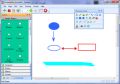
Το Presentation Assistant είναι το καλύτερο για σχόλια, εστίαση και εργαλείο βοήθειας για διδασκαλία, τεχνικές παρουσιάσεις, εκπαίδευση, επίδειξη, επεξηγήσεις και εργασίες για τα εσωτερικά meeting στην εργασία, ή αν χρειάζεστε απλά να εξηγήσετε οτιδήποτε σε κάποιον στον υπολογιστή σας. Σας βοηθά να προετοιμαστείτε για τις συναντήσεις σας πιο επικοδομητικά, και σας επιτρέπει να σχολιάσετε απευθείας στην οθόνη. Επιπρόσθετα, προσφέρει επιπλέον εργαλεία, - spotlight, κουρτίνα, ψηφιακό ρολόι οθόνης, δείκτη βέλους, μεγενθυτή, σύλληψη οθόνης, κ.λπ. Αγοράστε το Presentation Assistant σήμερα και εξοικονομήστε 50%!!
GIVEAWAY download basket


Προσφορές για iPhone »



Προσφορές για Android »





Σχόλια σχετικά με το Presentation Pointer 1.4.2
Please add a comment explaining the reason behind your vote.
Looks like a pretty good app to grab your audience's attention of by customizable mouse pointers, mouse clicks, visible keystrokes and a screen pen, with lots of customizable options availabl.
Decent alternative to Mousepose for MAC: so don’t be fooled by its current and once again misleading low GAOTD user rating.
In my view this GAOTD is a must have tool for anyone (webmarketers, teachers and IT Trainers) involved in demos, presentations and trainings (that's why it got a very low rating so far).
BEST FREEWARE ALTERNATIVES:
http://www.math.uaa.alaska.edu/~afkjm/PenAttention
http://sourceforge.net/projects/pointingstick
Enjoy!!
Save | Cancel
Terms and conditions:
3) Strictly personal usage.
How many peole have much audience at home?
Save | Cancel
Installed and registered without problems on a Win 8.1 Pro 64 bit system.
A Chinese (?) company without name and address.
This is a special program. It enlarges the windows arrow to a "presentation pointer" for displaying and educational purposes of the screen.
You can also display mouse movement, key strokes or clicks and "live zoom".
This is done via definable function keys.
This works as it should. I would prefer instead of function keys the use a special mouse key. And an advice to the developer.
Do NOT simply enlarge the key image, take a high resolution new image for different sizes. And make things "blinkable".
For those presentation screens to an audience a good and working help.
Save | Cancel
ZoomIt is a screen zoom and annotation tool for technical presentations that include application demonstrations. ZoomIt runs unobtrusively in the tray and activates with customizable hotkeys to zoom in on an area of the screen, move around while zoomed, and draw on the zoomed image. I wrote ZoomIt to fit my specific needs and use it in all my presentations.
ZoomIt works on all versions of Windows and you can use pen input for ZoomIt drawing on tablet PCs.
Using ZoomIt
The first time you run ZoomIt it presents a configuration dialog that describes ZoomIt's behavior, let's you specify alternate hotkeys for zooming and for entering drawing mode without zooming, and customize the drawing pen color and size. I use the draw-without-zoom option to annotate the screen at its native resolution, for example. ZoomIt also includes a break timer feature that remains active even when you tab away from the timer window and allows you to return to the timer window by clicking on the ZoomIt tray icon.
http://download.sysinternals.com/files/ZoomIt.zip
Save | Cancel
#5: "I wish something like this was used by people presenting on webinars. Often their mouse pointers are so tiny they are impossible to follow. The same goes for people making instructional videos for YouTube."
Believe it's a mark I guess I'd say of less professionalism. This isn't the only software of it's kind, and more than one screen cap app includes this sort of thing as well. But like with captioning for the hearing impaired, some people can't be bothered. Hopefully some of those people will happen by GOTD today, try Presentation Pointer, & buy a license [since the GOTD terms are personal use].
IMHO the old adage still applies: "If it's worth doing, it's worth doing well."
Save | Cancel