Ελληνικά
Προσφέρουμε καθημερινά ΔΩΡΕΑΝ λογισμικό με άδεια χρήσης, που θα αγοράζατε σε διαφορετική περίπτωση!
$29.95
ΕΛΗΞΕ
Giveaway of the day — DoubleSafety 4.4
DoubleSafety - Πρόγραμμα αντιγράφων ασφαλείας δεδομένων
$29.95
ΕΛΗΞΕ
Αξιολόγηση Χρηστών:
239
Σχολιάστε
DoubleSafety 4.4 ήταν διαθέσιμο ως προσφορά στις 4 Αυγούστου 2009!
Σήμερα Giveaway of the Day
Κόψτε τέλεια τις εικόνες, τοποθετήστε τις σωστά και αφαιρέστε στοιχεία που αποσπούν την προσοχή!
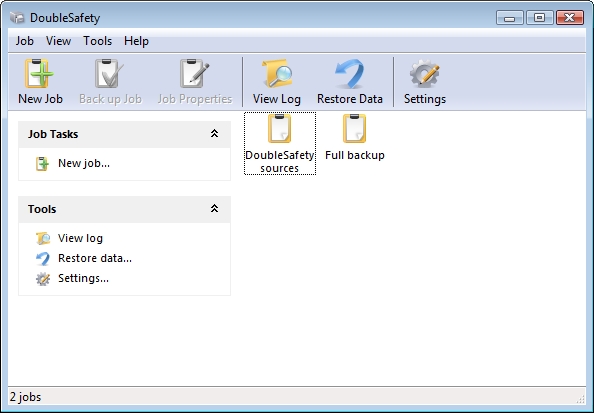
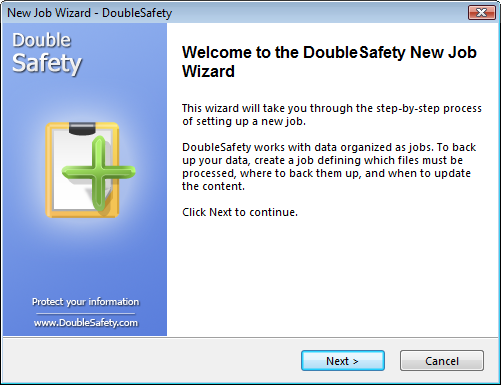
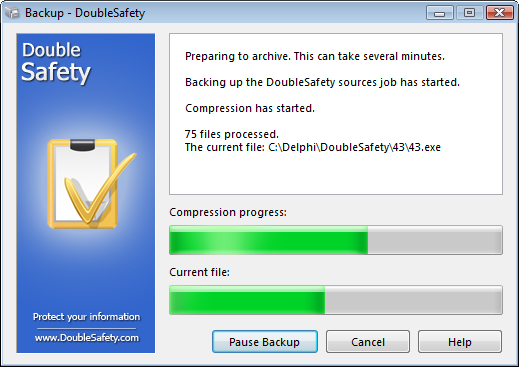
To DoubleSafety είναι εφαρμογή για την αυτόματη δημιουργία αντιγράφων ασφαλείας. Με ξεκούραστο περιβάλλον εργασίας, μπορείτε να αποθηκεύσετε τα αντίγραφά σας στον σκληρό δίσκο ή στο τοπικό δίκτυο, να τα στείλετε σε ένα διακομιστή FTP ή να τα γράψετε σε CD/ DVD ή Blu-Ray/HD-DVD. Μπορείτε ακόμα να τα κρυπτογραφείτε αυτόματα με την χρήση του αλγορίθμου AES 256 bit.
Πλεονεκτήματα χρήσης του DoubleSafety:
- Απλό περιβάλλον εργασίας
- Ισχυρός και ευέλικτος προσαρμόσιμος προγραμματισμός
- Κρυπτογράφηση με τον αλγόριθμο AES
- Ανέβασμα των ανιγράφων ασφαλείας σε διακομιστή FTP
- Εγγραφή αντιγράφων ασφαλείας σε CD/DVD και Blu-ray/HD-DVD
- Έλεγχος έκδοσης
- Αυξητικά και διαφορικά αντίγραφα ασφαλείας
- Αντίγραφα ασφαλείας και από ανοικτά αρχεία
Προαπαιτούμενα:
Windows 98/ME/2000/XP/2003/Vista/7; approximately 4MB of free disk space
Εκδότης:
Power LabsΣελίδα:
http://www.doublesafety.com/Μέγεθος Αρχείου:
3.08 MB
Τιμή:
$29.95
GIVEAWAY download basket

Developed by Informer Technologies, Inc.

View, manage, encrypt, pack, and unpack archive files.

Heal up your system and speed up your PC with the help of 25.

Developed by IObit
Προσφορές για iPhone »

$0.99 ➞ Δωρεάν σήμερα

For those of us who can appreciate weird and funny drawings, these stickers can’t fail to fascinate.
$0.99 ➞ Δωρεάν σήμερα

enhanceAI will vastly improve less-than-ideal images and add incredible detail with our optional Super Resolution.
$2.99 ➞ Δωρεάν σήμερα

$1.99 ➞ Δωρεάν σήμερα

Om Namah Shivay. You can listen to Om Namah Shivay aarti dedicated to Lord Shiva with this app.
$2.99 ➞ Δωρεάν σήμερα
Προσφορές για Android »

$6.99 ➞ Δωρεάν σήμερα

Blur Photo is the perfect censor photo app for blur background and picture blur.
$2.99 ➞ Δωρεάν σήμερα

The global bass booster and the equalizer enhances the sound quality of your Android device.
$1.99 ➞ Δωρεάν σήμερα

Want to get experience and emotion from driving a real city train in the metro simulator?
$0.99 ➞ Δωρεάν σήμερα

An alien ship has taken possession of multiple cities on planet earth, deploying countless robots.
$2.99 ➞ Δωρεάν σήμερα
Σχόλια σχετικά με το DoubleSafety 4.4
Please add a comment explaining the reason behind your vote.
DoubleSafety was last given out as v4.3 back in March. I wrote a full review on it back then. You can read it by clicking here.
Today's version is v4.4. I was unable to find a changelog from the developer's website. However I doubt there are many major changes from v4.3 -> v4.4.
A free alternative to this is GFI Backup.
Save | Cancel
As per the help file, these are the new changes to v4.4:
Version 4.4 (07/10/2009)
[+] E-mail notifications
[+] Windows 7 support
[*] Some interface problems have been fixed
Hope that helps.
Save | Cancel
to nr. 8:
Paragon was much more specialized to creating disk images, and this is more geared towards file/folder backups.
Save | Cancel
To John of No. 8, the program IS being offered FREE here that's why you don't have to buy it and that's the main reason why this site is called "Giveaway of the Day."
Save | Cancel
In a catastrophic systems crash a user can reinstall their Windows and other system applications easier than their tax records, photos, music, letters, etc. Therefore, a backup program like today’s GOTD definitely has usefulness since it’s geared toward protecting personal files more so than the system files; and using wizards can make the process more user-friendly overall. In previous backup GOTD’s a number of visitors had questions about what files should be backed up.
Any decent backup program should know what files and folders need to be backed up. But just in case, here are the likely candidates in Windows XP. All of these folders reside inside C:\Documents and Settings\Name, where Name is the name you use when you log into Windows:
- My Documents
- Desktop
- Application Data
- Favorites
- Local Settings\Application Data
And in Vista, where you can find these folders inside C:\Users\login
- Documents
- Pictures
- Desktop
- Music
- Contacts
- Videos
- AppData
- Favorites
For a purest it goes without saying that, you should back up every day you use your computer. If you’re not a purest (like me) once a week will keep you from having a coronary should the unspeakable fall upon you. I only back up files that have been created or changed since the last backup instead of overwriting each backup. If someone is considering an external HD for backups, go with the drive that holds about 25-percent more than the source drive you'll be backing up from. That will allow you to do a full and many incremental backups. One more general rule: Your backup should be physically separated from your computer. A backup that will be robbed or destroyed along with the rest of the computer is not a secure backup...lol
Save | Cancel