Προσφέρουμε καθημερινά ΔΩΡΕΑΝ λογισμικό με άδεια χρήσης, που θα αγοράζατε σε διαφορετική περίπτωση!
Giveaway of the day — Digital Photo Organizer
Digital Photo Organizer ήταν διαθέσιμο ως προσφορά στις 8 Δεκεμβρίου 2009!

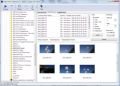
Your pictures will be perfectly sorted and ready for easy access at any time if you use Digital Photo Organizer. The user-friendly interface of the program ensures quick results and safe photo processing.
Digital Photo Organizer allowing you to:
- automatically sort photos;
- rename a group of photos in the batch mode using a template;
- give a unique name to every separate photo.
Προαπαιτούμενα:
Windows XP, Vista, Windows 7, 64bit
Εκδότης:
Alexander G StyopkinΣελίδα:
http://www.styopkin.com/digital_photo_organizer.htmlΜέγεθος Αρχείου:
1.69 MB
Τιμή:
$19.95
Προτεινόμενοι τίτλοι

Advanced Font Viewer is a comprehensive application, which is ideal for viewing, printing and managing your fonts. A full-featured font viewer quickly generates a high-quality display of your fonts.
Find & Remove All File Duplicates. How many file duplicates are there on your computer? You don't know, but you regularly come across copies of files, right? There are various reasons why duplicates appear, but no matter what these reasons are there is not much sense in storing them.
GIVEAWAY download basket


Προσφορές για iPhone »





Προσφορές για Android »





Σχόλια σχετικά με το Digital Photo Organizer
Please add a comment explaining the reason behind your vote.
Well, I installed it not expecting anything useful, and I am not disappointed. The images that come from my digital camera have sequential numerical names that are quite meaningless. This software allows you to make even longer, sequential, numerical, meaningless names. Yes, fully sorted if you are a mathematician! For normal people, finding a specific photo by name will still be impossible.
ACDSee and clones will do a much better job.
As for "# give a unique name to every separate photo." Windows doesn't allow identical names anyway - you HAVE to use unique names or they wont be on your computer! Absolute foolishness!
This software does nothing for me - it's uninstalled.
Save | Cancel
Digital Photo Organizer:
Download, installation, activation and first start of the programme were very fast without any hassle and even without right-click-administrator on Vista HP 32.
The GUI is clear, without unnecessary ornaments and intuitive.
But unfortunately, there is some need for improvements:
° You can't stop/interrupt the programme, only shut down with X or task-manager.
Single Renamer:
° Even for renaming of single photos, would a template be helpful.
Batch rename:
° The "Old Name" includes the extension (.jpg/.png), you can't delete it. When the old name shall be part of the new one, you'll have the extension twice in the new name. (Like: 005-OldName.jpg-2007-01-16.jpg)
° The thumbnails have a poor quality; especially those of resized JPGs with reduced JPG quality are heavily pixelated. Thumbs of .PNGs are much better.
° It seems that the programme is not able to read bigger(?) folders. e.g.: After loading for about 15 min I killed the process with task-manager; that was a folder of 1.45 GB, with 198 JPGs and 3 short AVIs.
Even smaller folders couldn't be read in an acceptable time or the programme froze.
Irfan View had no problem to show the thumbnails of even thicker folders very fast and in good quality.
° Well - the price is too high, especially when you look at lots of good freeware programmes.
Sorry Mr. Styopkin, I think you should improve this programme.
I like the straightforward design of your programmes, use and like your "Advanced Font Viewer" and the info about fonts on your site. Surely I will like an updated "Digital Photo Organizer" too.
Thanks for participating in the GOTD project.
graylox
Save | Cancel
Downloaded & installed fine on Vista Home Premium x64 bit OS.
You must run the "activate.exe" executable as Administrator for activation to take effect.
GUI is visually unattractive and unintuitive, but detailed Help File offers clear assistance.
Program offers several editing features, settings, and options, such as automatic resorting, batch renaming and single renaiming - but not as many functions as some freeware alternatives.
Not bad for a free giveaway, but I would not pay $19.95 for it.
Thanks for the program, GOTD and Mr. Styopkin.
Freeware Options:
Picasa - CNET User Rating 4/5
FxFoto - CNET User Rating 3.5/5
Save | Cancel
I'm using a totally free alternative i.e. Fast stone Image, and its much better
Save | Cancel
Installed fine but offers nothing than can be got elsewhere for free. I save all of my pictures into individual named folders in My Pictures so they are organised anyway. You can also batch rename photos in Windows very easily. If you need this type of programme then I suggest you use Picasa. It is free, very easy to use, has loads of features and it works. The only thing I would suggest with Picasa is to only let it scan your Desktop and My Pictures folder when given a choice or you will end up with millions of icons, bars, logo's etc. I should also point out that a couple of minutes with Picasa will transform any of the pictures that you take with your mobile phone that are just not quite as you want them. As for todays programme, at $19.95 it is massively overpriced and is still not worth considering for free as although there is nothing wrong with it there are far better programmes that do more for free everyday.
Save | Cancel