Προσφέρουμε καθημερινά ΔΩΡΕΑΝ λογισμικό με άδεια χρήσης, που θα αγοράζατε σε διαφορετική περίπτωση!
Giveaway of the day — Black&White projects 5 elements (Win&Mac)
Black&White projects 5 elements (Win&Mac) ήταν διαθέσιμο ως προσφορά στις 5 Μαρτίου 2019!

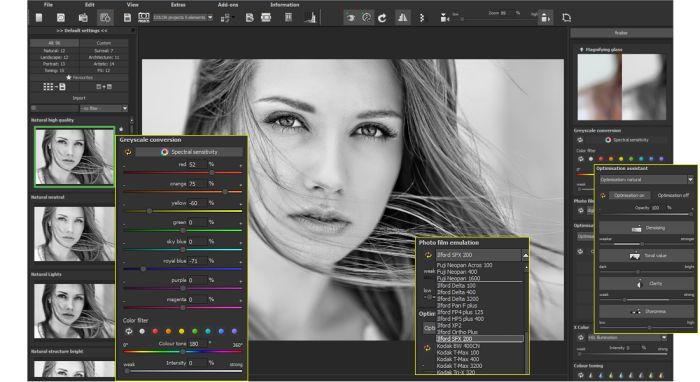
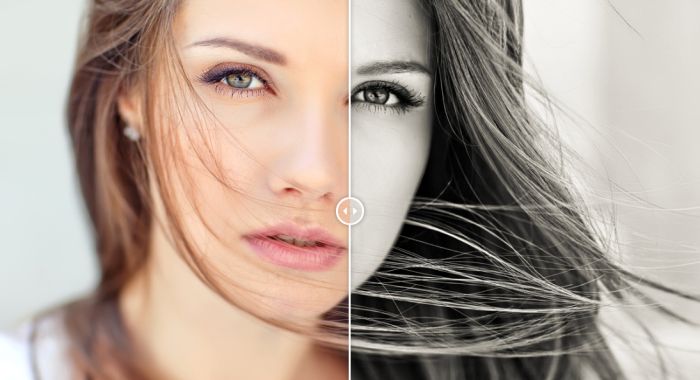
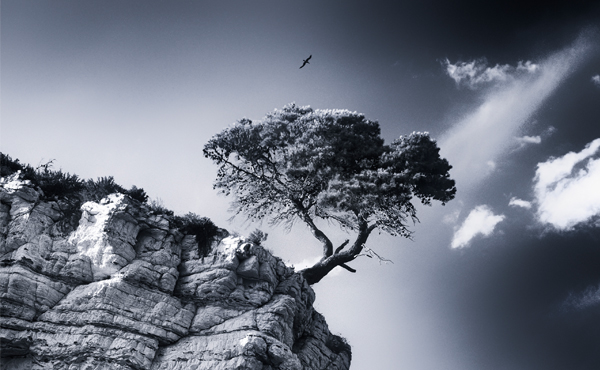

B&W έργων 5 στοιχεία που προσφέρει τη μοναδική ευκαιρία να μετατρέψει ψηφιακές έγχρωμες φωτογραφίες σε μεγάλο αριστουργήματα όλα – κατά τη χρήση των έξυπνων εργαλείων με μια αποτελεσματική, κρυστάλλινα ροής εργασίας. Πολλά καλά αναγνωρισμένη φωτογραφίες σε Μαύρο και Άσπρο και συχνά είναι το Black & White εκδόσεις του μια φωτογραφία – που θυμόμαστε περισσότερο!
- State-of-the-art B/W μετασχηματισμού με 96 χειροποίητα προ-σύνολα για τη φανταστική αριστουργήματα?
- Υψηλής ποιότητας εμπειρογνωμόνων φίλτρα, συμπεριλαμβανομένων επεκταθεί επιλεκτική εφαρμογές
- Αυτόματη λαμπρότητα βελτιστοποίηση των αρχείων εικόνας, το χρώμα dynamics, trapeze διόρθωσης και ελαφριά κάμψη διόρθωση?
- Επεξεργάζεται όλες τις δημοφιλείς μορφές εικόνας, συμπεριλαμβανομένων των ΠΡΏΤΩΝ;
- Προσαρμόσιμο πρόγραμμα επιφάνεια, συμπεριλαμβανομένων των 4K.
The current text is the result of machine translation. You can help us improve it.
Προαπαιτούμενα:
Minimum: Windows 10/ 8/ 7 (32 Bit), Prozessor Core Duo, 2 GB HDD, 1.280 x 1024 Pixels Screen Resolution, Graphic: DirectX-8-compatible, 128 MB, 32 bit colour depth; Mac OS X ab 10.7 (64 Bit), Prozessor Intel/G5, 2 GB HDD, 1.280 x 1024 Pixels Screen Resolution
Εκδότης:
FRANZIS Verlag GmbHΣελίδα:
https://www.projects-software.com/black-white/black-white-projects-5-elementsΜέγεθος Αρχείου:
224 MB
Τιμή:
$29.95
GIVEAWAY download basket


Προσφορές για iPhone »




Προσφορές για Android »



Σχόλια σχετικά με το Black&White projects 5 elements (Win&Mac)
Please add a comment explaining the reason behind your vote.
Hi I have made this comment before. I do not think it is just me but although the GOTD looks amazing I am totally confused on how to get it, copy this, paste that add an I/d put in the password go here go there. Look if the gift is really a gift then please why make it so difficult to get more so when others provide just give a password and the jobs done. Love the chance just finding it to difficult.
Save | Cancel
Too many complicated hoops to jump through.
Why cant it be less time consuming and simple.
Thanks anyway.
Save | Cancel
10 attempts to download it says wrong Reg. code Then 12 hours later another attempt and it registers !! why is the GOTD application so difficult?
Save | Cancel
I have a train to catch, but I do think the Pro version of B+W Projects 6 is the best B+W converter out there. I think Franzis have two stand-out tools, meaning I can't see better elsewhere - B+W and Sharpen, and some other really handy ones (e.g. HDR, Color). Anyway I wrote this for BWP4 and I'll repost (with a couple of quick tweaks) in case it's of help...
Okay, they are only giving away the Elements version, and it's an old version (6 is just about out), but it's free and I'd highly recommend it, hey I paid for it, well the Pro version. (Plus apologies in advance for what a pain it is to register - you can use a temp e-mail like 10minutemail.net for the download but I'd use a real one to register as it'll be a big help next time you get one of their giveaways. BTW I'm apologising as I'm suggesting you do this, I don't work for Franzis so not my fault.)
Note they will send you their newsletter, and they still forget from time-to-time and send English speakers e-mail in German. Don't stress about it. (They seem to be getting better though.)
Here's my getting-started instructions on using it:
Load a picture, play with the canned effects on the left side, play with the Film Type on the right side panel (which should start on the “Finalise” tab). At the top of that panel you can choose a colour filter to apply to the original (assuming it's a colour image, the same as putting a filter on the lens and using B+W film), either as a preset or use the sliders (the presets just move the sliders, e.g. Yellow -> 60/120). At the bottom of the panel you can select toning options (which would be a printing technique back in the day), which is the same theory of having a collection of presets which set sliders.
Changing to "Expert" in the right panel you can add filters from the list at the top, select them in the middle of the panel and tweak their effects at the bottom (may need scrolling down). (I'd ignore that until you are comfortable using it.) The boxes at the top of the left panel filter the effects that are listed in the panel, so ignore them initially (although using the favorites stars to select presets you like and then filtering on them is handy). On a faster computer you can use the Eye icon on the toolbar to disable the preview mode and show the final image in the main window, which IMHO is worth doing.
When saving the final image note that the first dialog, where it asks for the title, is going to write that over the image, it isn't the file name. That is the point you do cropping though.
The main disadvantage is the lack of full Undo operations.
Note that although they do add a Photoshop plugin it's under File->Export, not Filters, which IMHO doesn’t really count.
The thing to get your brain around is it a huge pile of image processing tools, which are gathered together into presets in the left pane. All those options do is select a bunch of processing tools and choose options for them, so they are infinitely tweakable in the right pane once you're up to speed (and if you want to).
BTW I bought a copy of BWP retail some time ago, but when they had a discount price - which they do quite often, so I'd say rather than paying the full price for Franzis' stuff sign-up for the newsletter and see if a deal appears. Basically 99% of the B+W images I post online came out of B+W Projects.
I suspect they haven't updated the installer and so only have an old version of the Raw file reader (for Raw files saved by digital cameras). To add raw support for more recent cameras download this (if you're running 64-bit Windows):
http://transfer.franzis.de/projects/RawImageDllprojects_Win64.zip
and replace C:\Program Files\Franzis\BLACK WHITE projects 4\FreeImage.dll (note I guessed the path, elements may go somewhere very slightly different) with the dll file it contains.
If you're not running the 64-bit version of Windows, i.e. your computer doesn't have a directory "C:\Program Files (x86)" then the file you want for upgraded raw support in 32-bit Windows is: http://transfer.franzis.de/projects/RawImageDll_projects_Win32.zip
If you have a Mac you'll need to get the OSX version of FreeImage from SourceForge and replace the existing one, wherever it might be.
Save | Cancel