Προσφέρουμε καθημερινά ΔΩΡΕΑΝ λογισμικό με άδεια χρήσης, που θα αγοράζατε σε διαφορετική περίπτωση!
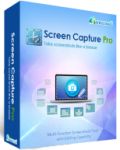
Giveaway of the day — Apowersoft Screen Capture Pro 1.1.3 (Win and Mac)
Apowersoft Screen Capture Pro 1.1.3 (Win and Mac) ήταν διαθέσιμο ως προσφορά στις 29 Μαρτίου 2015!
Apowersoft Screen Capture Pro is an all-round screenshot program available for both Windows and Mac users. It provides extensive selection of screenshot modes ranging from full screen to scroll window. If needed, you can even edit the screenshot in built-in instant or advanced image editor. Besides, it offers task scheduler which is intended for taking screenshots automatically at fixed time. Aside from the features mentioned above, it’s also capable of recording screen with audio, uploading screenshot to free Cloud server, sharing image via Facebook, Google+, Twitter and many more.
Key Features:
- Screenshot anything displayed on computer screen;
- Create schedule task for taking screenshot;
- Supports various image and video capture modes;
- Provides Simple and advanced image editor;
- Share image via social network easily;
- Upload screenshot to free Cloud space;
- Record screen with audio in high quality;
- Offers up to 9 output video formats and 6 image formats.
If you are a Mac OS user, please download the installation package here (1.54 MB).
Προαπαιτούμενα:
Windows XP/ Vista/ 7/ 10; Mac OS up 10.6.0
Εκδότης:
Apowersoft LtdΣελίδα:
http://www.apowersoft.com/screen-capture-proΜέγεθος Αρχείου:
18 MB
Τιμή:
$49.95
Προτεινόμενοι τίτλοι
Free audio recorder is a useful tool that supports both Windows and Mac. With it, you can easily record any audio, whether it’s online video or streaming music. Even better, it can also identify the audio track information like title, artist, album and year automatically.
Free Online Video Converter is a web-based application to convert videos in your local drive to any other formats that are compatible with your digital devices like PSP, iPhone, iPad, DVD player, etc. What’s more? This tool is totally free and does not require installation. You can use it right away.
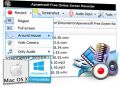
Free Online Screen Recorder is a simple yet feature-packed screen recording program, which works well on Windows and Mac. It supports a rich variety of recording modes and allows to record screen with system sound, microphone or both. Added to that, creating and recording schedule tasks, taking screenshots and uploading videos is likewise possible with this tool.

This Phone Manager is a unique freeware for mobile phone data management, which can synchronize your mobile devices with computer to access mobile data such as music, videos, photos, SMS, contacts, call logs, notes, eBooks and more. To be specific, it can do phone data transferring, restoration, and other management between your phone and PC. This mobile manager is fully compatible with mobile devices running on Android, iOS and Windows.
GIVEAWAY download basket




Προσφορές για iPhone »





Προσφορές για Android »





Σχόλια σχετικά με το Apowersoft Screen Capture Pro 1.1.3 (Win and Mac)
Please add a comment explaining the reason behind your vote.
Download and installed on Win7 64. no problems.
If you do not have a capture app, install this one during this giveaway. it is good enough as a free software. I would not recommend buying it because the price is way too expensive and (at least in my eyes) it is inferior to Faststone's http://www.faststone.org/FSCaptureDetail.htm which is also much cheaper.
Now why would I recommend it? (providing you get it for free today) This is a good question, there are many free alternatives, some with much more features, such as the excellent ScreenCaptor https://www.donationcoder.com/Software/Mouser/screenshotcaptor/ that is also easier to use. The answer is that although I find ScreenCaptor supirior in all aspects, there are two features (that if you have to have) today's giveaway would be a better choice.
1) scroll down window capture, which I find in ScreenCaptor to be a little stuttering.
2) Today's giveaway has a video screen capture feature as well as the image screen capture. if you do not have a video screen capture and you need one, Apowersoft will answer the need. again not the best out there, but good enough considering that you get it for free today.
Save | Cancel
May I suggest the Free, Open Source and very good Greenshot ? https://sourceforge.net/projects/greenshot/
Capture to cloud, included picture editor, small and nice.
Save | Cancel
Greenshot is very handy program. Many more freeware screen capturing /recording programs are available :
PicPick Portable - http://www.picpick.org/en/download_portable
Grabilla Screen Capture and ScreenCast - http://grabilla.com/
Screenr - https://www.screenr.com/
MWSnap - http://www.mirekw.com/winfreeware/mwsnap.html
VIDEO CAPTURE :
Icecream Screen Recorder - http://icecreamapps.com/screen-recorder/
CamStudio Portable - http://portableapps.com/apps/utilities/camstudio_portable
ActivePresenter
Free Edition - http://atomisystems.com/activepresenter/free-edition (Record full motion video)
Fast & Easy Screen Recorder - http://www.ezvid.com/
SMRecorder - http://www.video2down.com/index.php/documentation/smrecorder.php
Screen2Avi - http://www.trustfm.net/software/video/Screen2Avi.php
Save | Cancel
FAIL.
• It tries to take over your decision of what should be your default audio device.
• It elbows out other devices such as Realtek and positions Apowersoft audio device as the default, without asking your permission or notifying you.
• It has a good video capture component.
• But severely limited by only a few video codecs that it can use. Mainly Windows types.
• There is no way to add other new and better video codecs for the software to use.
• It has a very bad audio component(maybe because I chose not to use Apowersoft audio device). All video recordings are without any audio. No sound.
• When using microphone + system sound input, there are strange echos, reverb and continuous scratching sounds but still no sound from the video captured.
• When I checked Windows Control Panel, discovered that now I cannot even access Realtek HD audio driver to turn on the Stereo Mix input.
• Audio codecs are limited to only a few - mainly Windows types.
• You cannot add other new and better audio codecs.
It leaves many remnants of Apowersoft-AudioDevice in Registry, even after uninstall using Revo.
Save | Cancel
Installed and registered without problems on a Win 8.1.3 Pro 64 bit system.
A company without name and address: "Our objective is to become the outstanding provider in the area of software solutions and online applications, adding color to your digital life and facilitating your works." Adding color to my digital life? This must be Chinese...
We had had several programs from this company in the past.
The registry shows, that there is another freeware:
Bytescout Screen Capturing - free screen recorder: record full screen or capture selected region, save screen video to AVI files with sound.
http://i.imgur.com/D8V5yRU.png
I don't see any credits for this software. I don't like this.
Upon start a blue UI opens with the options for screen recording. This is done without problems. After taking a screenshot a complete image editor opens:
http://i.imgur.com/eKbPgZC.png
A first attempt to upload to Screenshot.net led to a 404:
http://i.imgur.com/nTqBvtI.png
A second upload some times later finished without problems.
A rather complete screenshot program, does what it claims. Or should I say Bytescout does...
If you don't have any, you can take this. I'll keep my existing screenshot program.
Uninstalled via reboot.
Have anice Sunday!
Save | Cancel