Ελληνικά
Προσφέρουμε καθημερινά ΔΩΡΕΑΝ λογισμικό με άδεια χρήσης, που θα αγοράζατε σε διαφορετική περίπτωση!
$29.90
ΕΛΗΞΕ
Giveaway of the day — AnyPic Image Resizer Pro
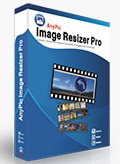
To AnyPic Image Resizer Pro σας επιτρέπει να αλλάξετε το μέγεθος, μετατρέψετε, προσθέσετε υδατογράφημα σε εκατοντάδες εικόνες σε μαζική λειτουργία.
$29.90
ΕΛΗΞΕ
Αξιολόγηση Χρηστών:
341
Σχολιάστε
AnyPic Image Resizer Pro ήταν διαθέσιμο ως προσφορά στις 8 Μαΐου 2011!
Σήμερα Giveaway of the Day

Δημιουργήστε αντίγραφα ασφαλείας και διαχειριστείτε όλα τα περιεχόμενα στη συσκευή σας.
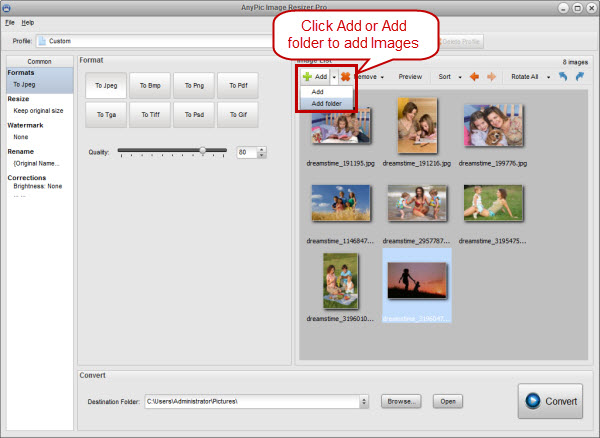

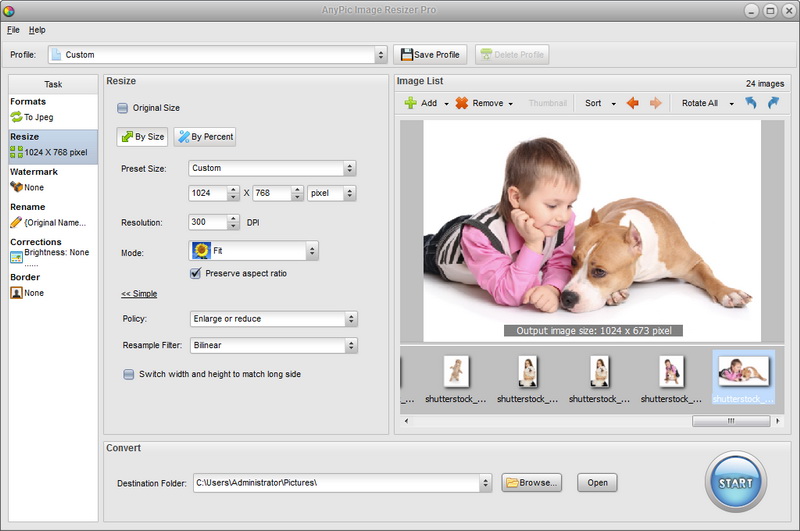
To AnyPic Image Resizer Pro σας επιτρέπει να αλλάξετε το μέγεθος, μετατρέψετε, προσθέσετε υδατογράφημα σε εκατοντάδες εικόνες σε μαζική λειτουργία. Υποστηρίζει τα πιο δημοφιλή είδη αρχείων εικόνας: JPEG, BMP, TIFF, PNG, PSD, GIF, TGA, RAW, κλπ. Είναι γρήγορο και εύκολο εργαλείο μετατροπής κατάλληλο τόσο για ερασιτέχνες όσο και επαγγελματίες φωτογράφους που έχουν να κάνουν με ψηφιακές φωτογραφίες, με ένα κλικ οι φωτογραφίες είναι έτοιμες για τα Web, blog, e-mail, για εκτύπωση, κλπ.
Σημαντικά χαρακτηριστικά:
- Αυτόματο, γρήγορο, εύκολο στη χρήση.
- Αλλαγή μεγέθους εικόνας για κάθε χρήση.
- Υποστήριξη εκατοντάδων μορφότυπων.
- Μαζικές μετατροπές.
- Εξαγωγή εικόνων με την υψηλότερη ποιότητα.
- Υδατογράφημα για Προστασία από Αντιγραφή.
Προαπαιτούμενα:
Windows 7/ 2000/ XP/ Vista
Εκδότης:
AnyPic SoftΣελίδα:
http://www.batchimageconverter.com/image-resizer-pro/Μέγεθος Αρχείου:
5.89 MB
Τιμή:
$29.90
GIVEAWAY download basket

Developed by Corel Corporation

Developed by The GIMP Team

Developed by Adobe Systems Incorporated

Create 3D models of buildings, garages, roofs, etc.
Προσφορές για iPhone »

This app is great for creating stories especially if you have recorded multiple videos.
$2.99 ➞ Δωρεάν σήμερα

$3.99 ➞ Δωρεάν σήμερα

Travel the world over from Bessie's Farm to the plains of Africa to the deepest reaches of outer space.
$12.99 ➞ Δωρεάν σήμερα

$0.99 ➞ Δωρεάν σήμερα
$0.99 ➞ Δωρεάν σήμερα
Προσφορές για Android »

$0.99 ➞ Δωρεάν σήμερα
Hidden Numbers is an original educational Math game in which you will practice Math and counting numbers.
$2.49 ➞ Δωρεάν σήμερα
This game is the greatest combination of Role-playing game (RPG) and Player vs Player (PvP).
$0.99 ➞ Δωρεάν σήμερα

"Virtual Reality Games" is a collection of the worlds best mobile vr games.
$1.99 ➞ Δωρεάν σήμερα

$2.59 ➞ Δωρεάν σήμερα
Σχόλια σχετικά με το AnyPic Image Resizer Pro
Please add a comment explaining the reason behind your vote.
I am totally into image manipulation (especially batch) so I immediately downloaded and tested today's promotion (my usual thanks to GOTD + developer of the day)... Here is my feedback:
Plenty of -more or less comparable- freeware (FastStone Photo Resizer, Fast Image Resizer, IrfanView, Photoscape, Xnview... etc.) available, so lots of aggressive competitors for AnyPic Soft!
I knew were to look (since I have been testing a few titles in the past days... Yes, that's nice for you too!) so my test took relatively short time to complete.
I will (intentionally) not enter into specific details as results following to image manipulation are bound to a pretty vast array of factors and while one can be pleased by the pure visual aspect, others might be more focused on the technical side or the printing quality or the individual file size... So I will simply express my opinion of today's promoted software in relation to the other applications that I have been testing.
General consideration about this jack of all trades but master of none:
- Overall a nice (not much difference to be noticed when changing skin) and intuitive interface
- Plenty of useful features, but pretty much the same that can be found also in most freeware... I am puzzled therefore about the almost 15 MB of footprint!
- Acceptable processing speed
- Quality of manipulated images is not showing much difference from the one obtained with other (free) programs
Six tasks available in the GUI... And my concise comments and scores (to avoid misunderstandings, 10/10 is the max):
Formats: Several supported formats to convert to (Jpeg, Bmp, Png, Pdf, Tga, Tiff, Psd and Gif) 7/10
Resize: 8/10 (see more elaborated comment at the bottom)
Watermark: Quite good 9/10
Rename: Pretty basic (for example "DATE" will only add current system date and NOT file creation date, which would have been handy especially for pics) 6/10
Corrections: Standard (missing gamma) 6/10
Border: Very basic (missing masks/frames) 5/10
My comment about "Resize":
I definitely miss the "Keep Original Format" option.
Assuming that I have a folder containing multiple png, jpg, bmp files and I want to batch resize them all to a specific size (or batch rename them all to a specific name) without the "Keep Original Format" option during the resize/rename process, the format of some of the files will unavoidably change, whereas if that (useful) option would have been available I could just batch resize/rename all my images without having to affect the file formats... And consequently their file size (don't forget that the same jpg -an average one- converted into a bmp can be 10 times larger in size!) and other important intrinsic features!
Definitely a keeper for all those with basic needs... But (sorry) I fail to see why the "pro" attribute was added to the name (Image Resizer Pro).
Lastly, please remember that the way a person sees or perceive a thing (whether it is a software or a sunset) it is very individual, so my advice to all readers is to take a closer look at the various features of this application (by personally experimenting all available tasks/functions) and -you never know- you might discover that my conclusions do not necessarily reflect yours and it might very well be that this program suits perfectly your current needs.
Hopefully this concluding paragraph will prevent some of the replies I have noticed in other occasions, which are filled with expressions of disagreement (and utterly useless polemics).... Bottom line that's my opinion bearing in mind what the other currently available programs offer and in relation to my current needs and requirements... If some of you don't see it that way there no need to raise an issue here on the GOTD thread... Let's keep it as pleasant as possible for all readers ;)
Hope this was useful reading.
Save | Cancel
Does what it says OK but little more.
It Works very quickly and the results look very good so full marks for ability, AND it is very easy to use so no deep learning curve.
I cannot really see the point of lots of tiny programs for individual jobs, tho. Glad to see that it does support RAW.
Pretty sure Irfanview does this. Photobie DEF does and I think Photoscape does, too. All of the progs mentioned come close to professional offerings (ESP photobie) AND ARE ALL FREE so this one doesn't have a place for me.
Thanks anyway.
Save | Cancel
Just use FastStone Image Resizer - free all the time, awesome piece of kit!
Save | Cancel
I decided to give this program a test run, but I don´t like all those programs on my PC there is only able to do 1-2 functions. That will give me 100x 12MB for the functions that Paint.Net have and that is far too much...
- Yes, I did use Paint.Net to compare with and the result was better than I had ever expected.
- I took a picture there is 255x321 pixel and asked the program to make it 4 times that size, 1020x1284 pixel.
- I used the very sensitive format JPEG, because other format like BMP wouldn´t show the real quality of the program. But JPEG or BMP, you get the same result in this program.
- I did apply all kind of best quality in both programs and the best program for this task is AnyPic Image Resizer Pro.
Why is it better ?
Simple - It make a sharp and clean picture were you can see the person as you actually stayed in front of the person in real time.
The watermark function can be used with text and picture at the same time. Overall this program do what it says, but the price of $30 is $15 too much...
Save | Cancel
Something that I appreciate the readers here, is that you often receive tips about free software bonded same genre, which can then be compared to today's GAOTD offer. One can then easily decide which one suits you the best. Often the result is that free software is the preferred, although it may lack some features that today's programs provide, but which nevertheless meets the requirements you have!
Save | Cancel